
You need a form. Maybe it’s for customer inquiries, lead generation, event registrations or taking payments. You search for a tool, and two names keep coming up: Jotform and Typeform.
Choosing between them isn’t just about which form looks better. The right choice depends on how you collect information, what your customers experience, and what you need to do with the responses afterwards.
Why the Choice Matters
A form is often the first real interaction someone has with your business. Pick the wrong tool and you’ll feel it quickly: unexpected costs, a clumsy setup, or a form that frustrates the people you want to reach. Three questions are worth asking before you commit:
- Is the form easy for customers to complete? A confusing or tiring form means abandoned submissions and lost leads.
- Can your business collect the information it needs? Payments, file uploads, signatures and conditional questions are not available, or equally easy, in every tool.
- Does the price make sense for the features and volume you need? Plans are priced around different limits, so the cheapest headline price isn’t always the cheapest in practice.
- Jotform is worth evaluating first for business forms, a wide choice of templates, customization, payments and workflow needs.
- Typeform is worth evaluating first if a conversational, one-question-at-a-time experience and the respondent’s journey are your top priorities.
These are starting points, not absolute rankings. Features and plans change, so confirm the current details on each tool’s website before you buy.
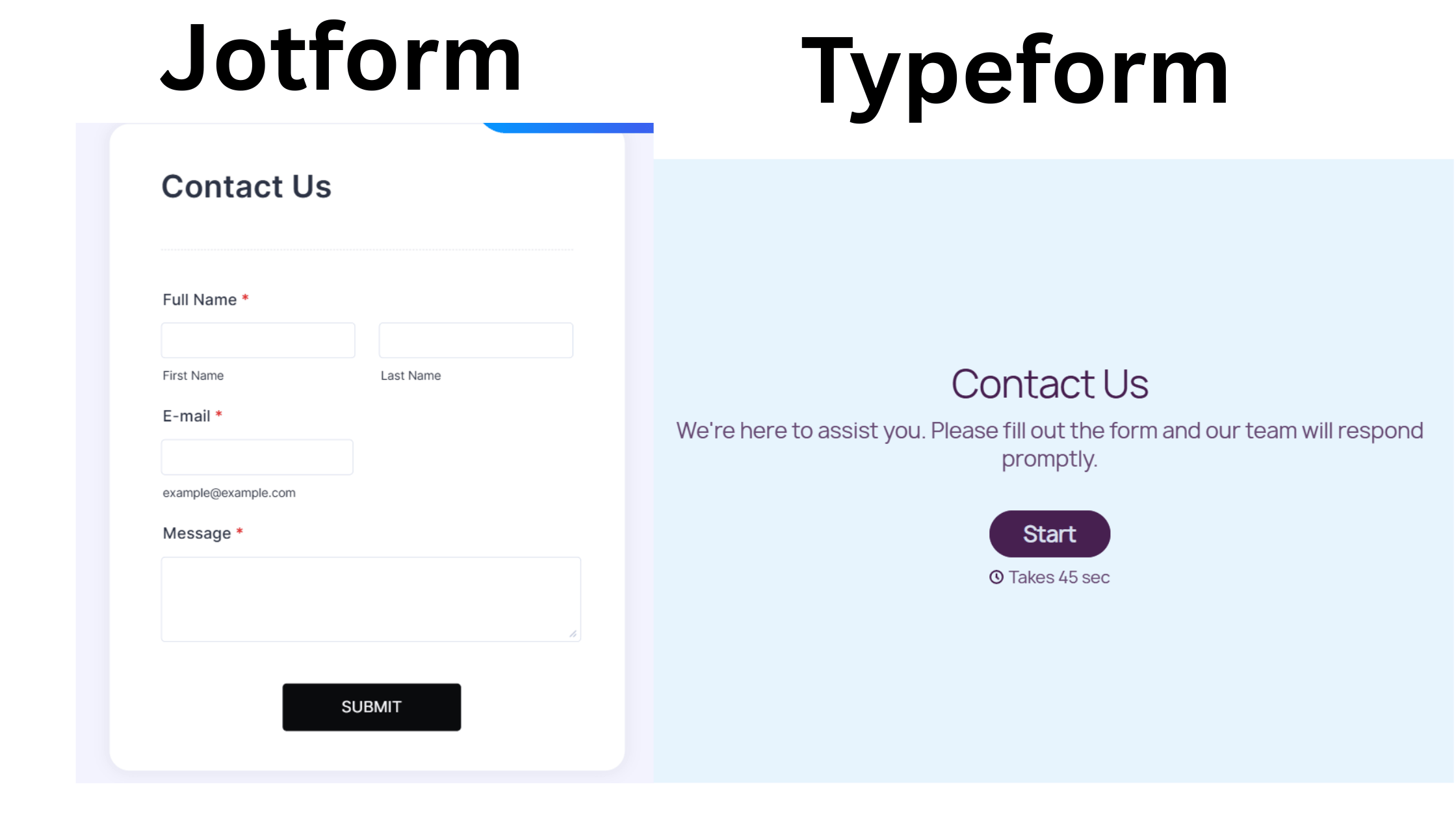
Jotform vs Typeform: Comparison Table
| Area | Jotform | Typeform |
|---|---|---|
| Ease of use | Drag-and-drop builder with many options; templates speed things up | Clean, guided editor focused on one question at a time |
| Templates | Thousands across many business uses | A smaller, design-led selection |
| Form style | Classic (all on one page) or Card (one question at a time) | Conversational, one question at a time |
| Customization | Extensive: themes, fonts, colors, logo, custom CSS | Strong visual design within its own format |
| Conditional logic | Show/hide fields, skip pages, calculations | Logic jumps and branching between questions |
| Payments | Built-in payment fields with several gateways | Payment option available; check current gateways and plan |
| Integrations | Large library (Sheets, Slack, Notion, Zapier and more) | Good integration set; some premium ones need higher plans |
| Notifications | Email notifications and autoresponders | Email notifications and integrations |
| Embedding | Link, embed code, popup and more | Inline, popup, slider and full-page embeds |
| Free plan | 5 forms, 100 submissions a month | Very limited: around 10 responses a month and a question cap |
| Paid pricing (annual billing, entry level) | From about $34/month | From about $28/month, with a lower response cap |
| Best for | Business forms, payments, workflows | Engaging surveys and short lead forms |
| Main limitation | More options can feel busy at first | Response caps and fewer business-form features |
Prices and limits shown are approximate and based on publicly listed 2026 plans. They change, so verify on Jotform’s pricing page and Typeform’s pricing page before deciding.
The Important Differences, in Plain English
Ease of use and form creation
Typeform’s editor is tidy and guided, and building a short form feels quick. Jotform has more going on, so the first session can feel busier, but starting from a template and editing a few fields takes about the same time.
If you plan to build several different kinds of forms, Jotform’s range pays off. If you only need one polished short form, Typeform’s simplicity is appealing.
Templates and customization
Jotform has thousands of templates covering contact forms, registrations, order forms, applications and bookings, and it gives you detailed control over colors, fonts, spacing and branding.
Typeform has fewer templates, but they are well designed, and the visual style is part of the appeal.
The conversational experience
This is Typeform’s signature. Showing one question at a time feels like a chat, which can make a longer survey less intimidating.
Jotform offers a similar Card layout, though most people use its Classic one-page layout for business forms. If the conversational feel is the whole point, Typeform is purpose-built for it.
Conditional logic
Both support logic. Typeform’s logic jumps send people down different paths based on their answers.
Jotform lets you show or hide individual fields, skip pages, run calculations and trigger different emails. For simple branching they’re comparable. For forms that need calculations or lots of conditions, Jotform has more depth.
Payments and integrations
Jotform includes payment fields that connect to several gateways, so you can take deposits, sell products or collect fees inside a form.
Typeform also offers payment collection, but gateway choices and plan requirements differ, so check the current details if payments matter to you.
On integrations, both connect to popular tools; Jotform’s library is larger, and some of Typeform’s premium integrations sit on higher plans.
Lead collection and notifications
Both send notifications and push responses to tools like Google Sheets or your CRM. Jotform adds autoresponders, approval flows and many ready-made lead and inquiry templates.
Typeform’s strength is completion: a short, engaging form can lift how many people finish it.
Branding and embedding
Both let you share a link or embed a form on your site. Typeform offers inline, popup, slider and full-page embeds that match its conversational style.
Jotform offers link and embed options that work with common site builders. On either tool, remove the vendor branding with a paid plan if a professional look matters.
Free plan limits and paid pricing
This is where the two differ most in practice. Jotform’s free plan allows 5 forms and 100 submissions a month.
Typeform’s free plan is far tighter, with a small monthly response cap and a limit on questions per form, so it’s best viewed as a trial.
On paid plans, entry prices are close, but Jotform’s tiers are generally built around larger submission allowances, while Typeform’s entry plan caps responses more tightly. If you expect steady traffic, compare the cost at your own volume.
Limitations to know
- More options can feel busy at first
- Free and lower tiers cap forms and submissions
- Response limits can become costly as volume grows
- Fewer features for payments, signatures and heavy business workflows
Demo: Build a Freelancer Client Inquiry Form
Let’s solve one real problem: a freelancer needs a form that captures new project inquiries, sends an alert, and replies to the client automatically. Here’s how I’d build it in Jotform, in about ten minutes.
Step 1: Start from a template
Log in to Jotform, click Create, choose Use a template and search “client intake” or “contact form”. Pick one and click Use Template.
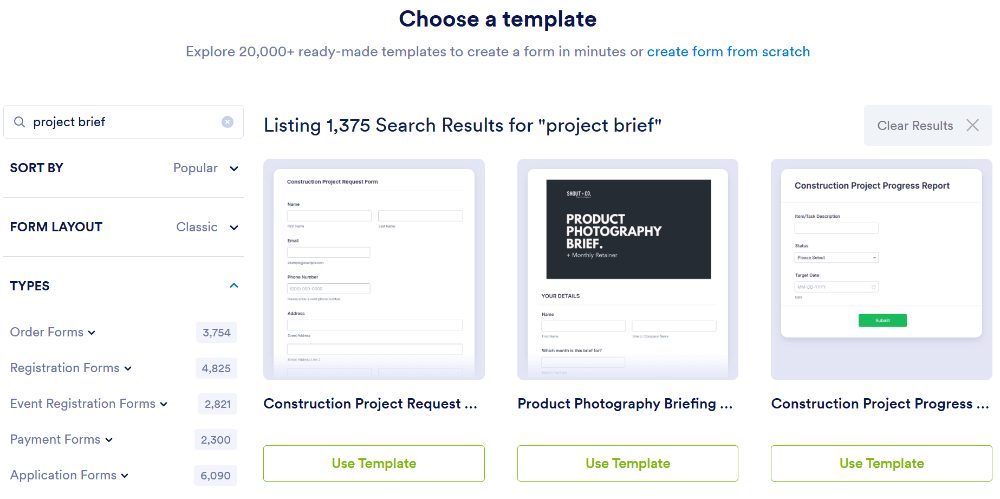
Step 2: Customize the questions
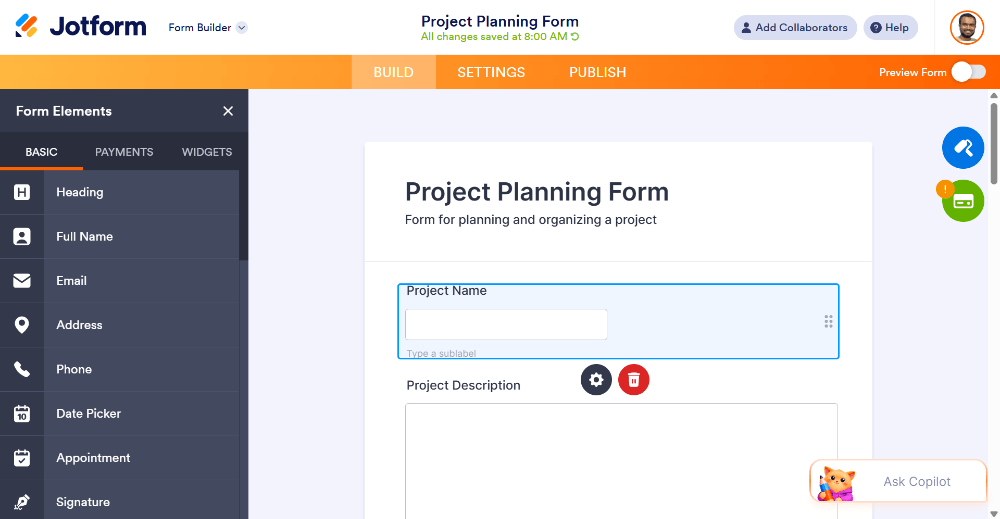
Keep it short. For a freelancer, these work well: name, email, service needed (dropdown), budget range (dropdown), deadline (date picker) and project description (long text). Mark only name, email and project description as required. Delete anything else.
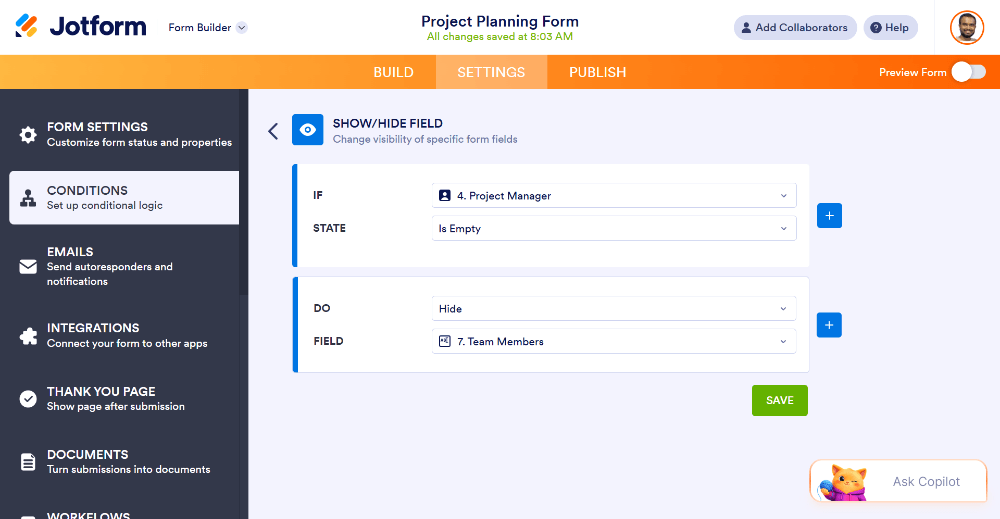
Step 3: Add conditional logic
If the client picks “Website design”, show a field asking for their current site. If they pick “Copywriting”, show one asking about word count. The form stays short while you still collect the right details.
Step 4: Brand it
Open the Form Designer (paint roller icon). Add your logo, choose your brand colors, and pick a readable font size. Preview the mobile view.
Step 5: Configure notifications
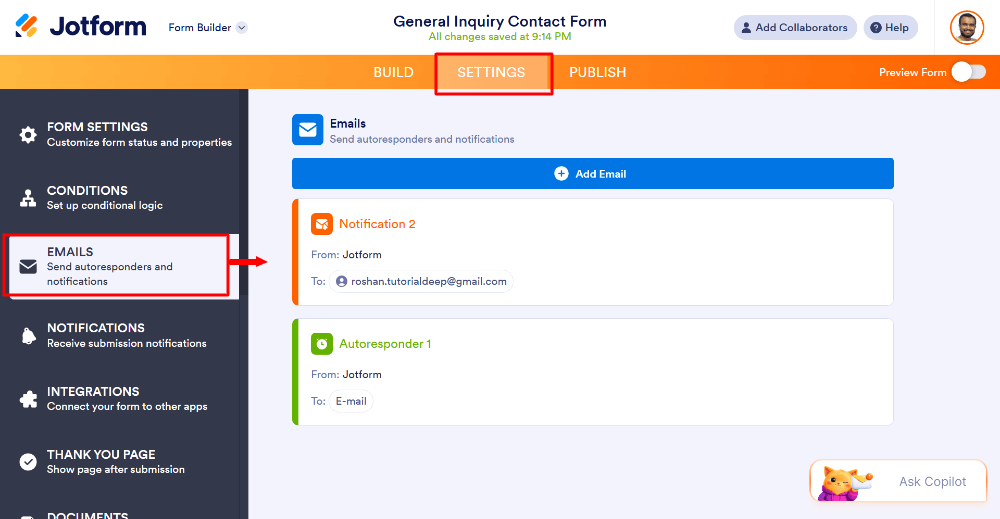
Go to Settings → Emails. Set a Notification email so you’re alerted to each inquiry, and an Autoresponder that thanks the client and says when to expect a reply, for example “within one business day”.
Step 6: Test and publish
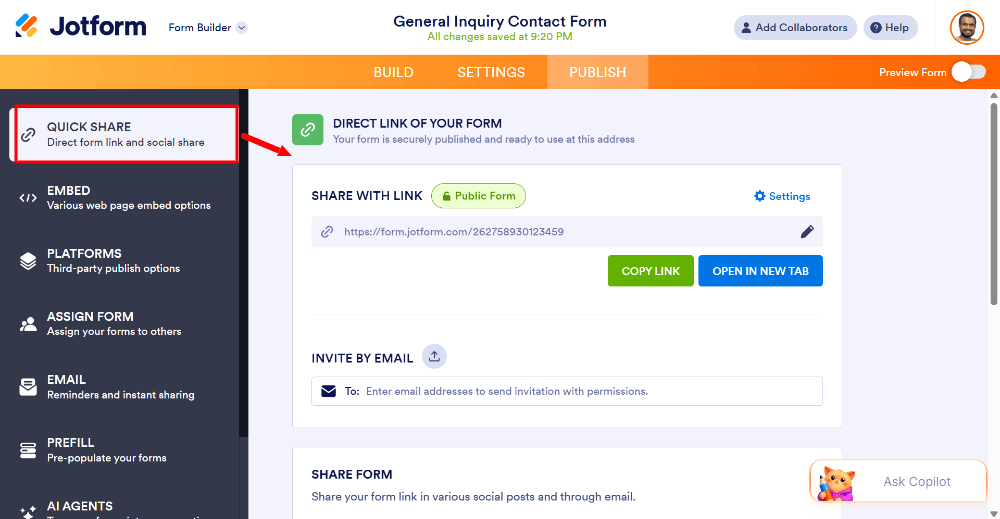
Click Preview, submit a test inquiry, and confirm that the notification and autoresponder both arrive. Check the answers in your submissions inbox, then open the Publish tab to copy the link or embed code.
When Typeform would be the better choice for this same task
If your inquiry form is very short (say, five questions), you care a lot about a polished, conversational feel, and you only expect a handful of inquiries a month, Typeform could suit you well. If you also want a deposit payment, a signed agreement, or many different forms under one account, Jotform’s wider toolkit is the safer fit.
Which Is Best for Your Situation?
Freelancers
Jotform if you want inquiry forms, deposits and contracts in one place. Typeform if you only need one beautiful, short inquiry form. If your budget is tight, a free tool like Google Forms or Tally may be enough to start.
Small businesses
Jotform, for the template range, notifications, payments and the number of forms a growing business ends up needing.
Marketers and lead-generation teams
It depends on the funnel. Typeform’s conversational format can improve completion on short, top-of-funnel forms.
Jotform fits better when forms feed a wider workflow with integrations, payments or approvals. Run an A/B test with your own audience before committing.
Surveys and feedback
Typeform for engaging customer surveys where completion matters. Google Forms is a perfectly good free option for simple internal surveys.
Payment collection
Jotform, for its built-in payment fields and range of gateways. Confirm that your preferred gateway is supported on the plan you choose.
Businesses on a tight budget
Start free. Jotform’s free plan (5 forms, 100 submissions a month) is more usable than Typeform’s. If you only need basic forms and no payments, Google Forms costs nothing and has no response cap.
Ready to Try Jotform?
Need a form for customer inquiries, quote requests or client intake? Explore Jotform’s templates and see whether it fits your workflow. The free plan lets you build and test a real form before you spend anything.
Frequently Asked Questions
Is Jotform better than Typeform?
Neither is better for everyone. Jotform tends to suit business forms that need many templates, payments, customization and workflows. Typeform tends to suit conversational, one-question-at-a-time forms where the respondent experience is the priority.
Which is cheaper, Jotform or Typeform?
At the entry paid level, the monthly prices are similar, but the limits differ. Jotform plans are generally built around higher submission allowances, while Typeform’s entry plan caps monthly responses more tightly. Compare current plans against your expected volume.
Which has a free plan?
Both. Jotform’s free plan allows 5 forms and 100 monthly submissions. Typeform’s free plan has a much lower monthly response cap and a question limit per form. Check each pricing page for current limits.
Which is better for lead generation?
It depends on the audience. Typeform’s conversational format can feel engaging for short lead forms.
Jotform offers more templates, integrations, notifications and payment options, which suits lead forms that feed a wider workflow. Test both with your audience.
Can both accept payments?
Both support payment collection in some form, but the gateways, fees and plan requirements differ. Jotform offers payment fields with several gateways. Confirm the current options and plan requirements for each tool before relying on them.
Which is easier to embed on a website?
Both provide embed options such as inline, popup and full-page. Both work with common website builders, so ease of embedding is rarely the deciding factor.
Final Verdict
Choose Jotform if you want a flexible tool for business forms, with templates, payments, notifications and room to grow. Choose Typeform if the conversational experience and visual polish of a short form matter most to you.
If budget is the main concern and your needs are basic, a free tool may be all you need. The best way to decide is to build the same small form in both and see which one your audience, and you, prefer.