
Google Forms and Jotform are two of the most popular online form builders, and they’re built for different jobs. One is a free, no-frills tool that lives inside Google’s ecosystem. The other is a full form platform with payments, signatures, advanced logic and thousands of templates.
So which should you use? This comparison looks at features, pricing, design, payments, integrations and ease of use, then gives a clear verdict for each type of user.
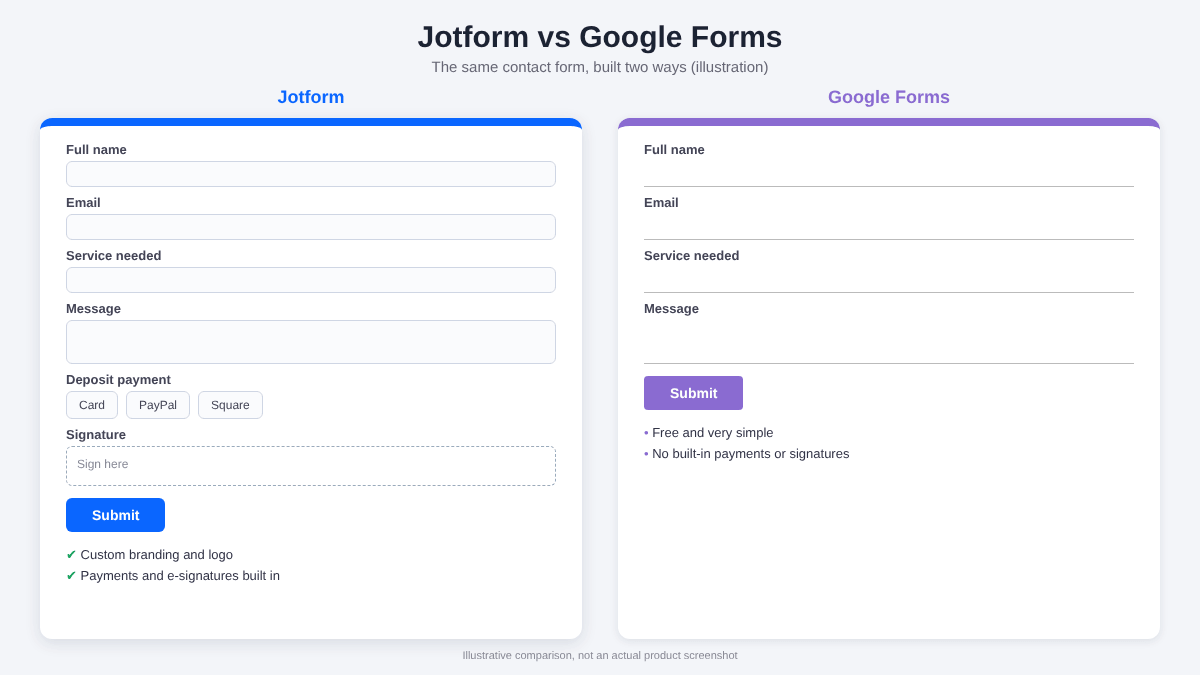
Overview: What Each Tool Does Best
Google Forms
Google Forms is free with any Google account. You can build a form in minutes, share a link, and see responses collected in Google Sheets. It’s popular for surveys, quizzes, event sign-ups and quick internal data collection.
- Completely free
- Very easy to learn
- Responses go straight to Google Sheets
- Easy real-time collaboration
- Limited design and branding
- No native payment collection
- Few templates
- Basic logic and no built-in e-signatures
Jotform
Jotform is a full online form platform. You build forms with drag and drop, choose from thousands of templates, collect payments, gather signatures and send data to the tools you already use. It also has a free plan.
- Thousands of ready-made templates
- Built-in payments and e-signatures
- Strong design and branding control
- Conditional logic and many integrations
- More options, so a slightly longer learning curve
- Free plan limits forms and monthly submissions
Jotform vs Google Forms: Comparison Table
| Feature | Jotform | Google Forms |
|---|---|---|
| Free plan | Yes, with limits on forms and submissions | Yes, free with a Google account |
| Templates | Thousands | A small selection |
| Design and branding | Extensive (themes, fonts, colors, logo, custom CSS) | Basic (header image, color, font) |
| Payment collection | Yes, with multiple gateways | No native option |
| E-signatures | Yes | No |
| Conditional logic | Field-level show/hide, calculations, more | Section-based branching |
| File uploads | Yes | Yes (requires respondents to sign in to Google) |
| Integrations | Many (Sheets, Slack, Notion, Zapier and more) | Best with Google Workspace |
| Card (one-question-at-a-time) layout | Yes | No |
| Best for | Businesses, freelancers, client-facing forms | Simple surveys and quick internal forms |
Features and limits change over time. Check each tool’s website for current details.
Ease of Use
Google Forms wins on pure simplicity. The interface is minimal, and most people can build a form within a couple of minutes without reading any instructions.
Jotform has more to explore, but it’s still beginner-friendly. Starting from a template and editing a few fields takes about the same time, and the drag-and-drop builder makes it easy to move things around. The extra options are there when you need them and out of the way when you don’t.
Verdict: Google Forms is simpler. Jotform is easy enough, with far more room to grow.
Templates and Design
This is where the two tools differ most. Google Forms offers a limited set of templates and basic customization: a header image, a theme color and a few fonts. Forms are clean but look generic, which matters if you’re sending them to clients.
Jotform has thousands of templates covering contact forms, registrations, order forms, applications, bookings and more. You can change colors, fonts, backgrounds, spacing and your logo, so forms look like part of your brand.
You can also choose between a classic one-page layout and a card layout that shows one question at a time.
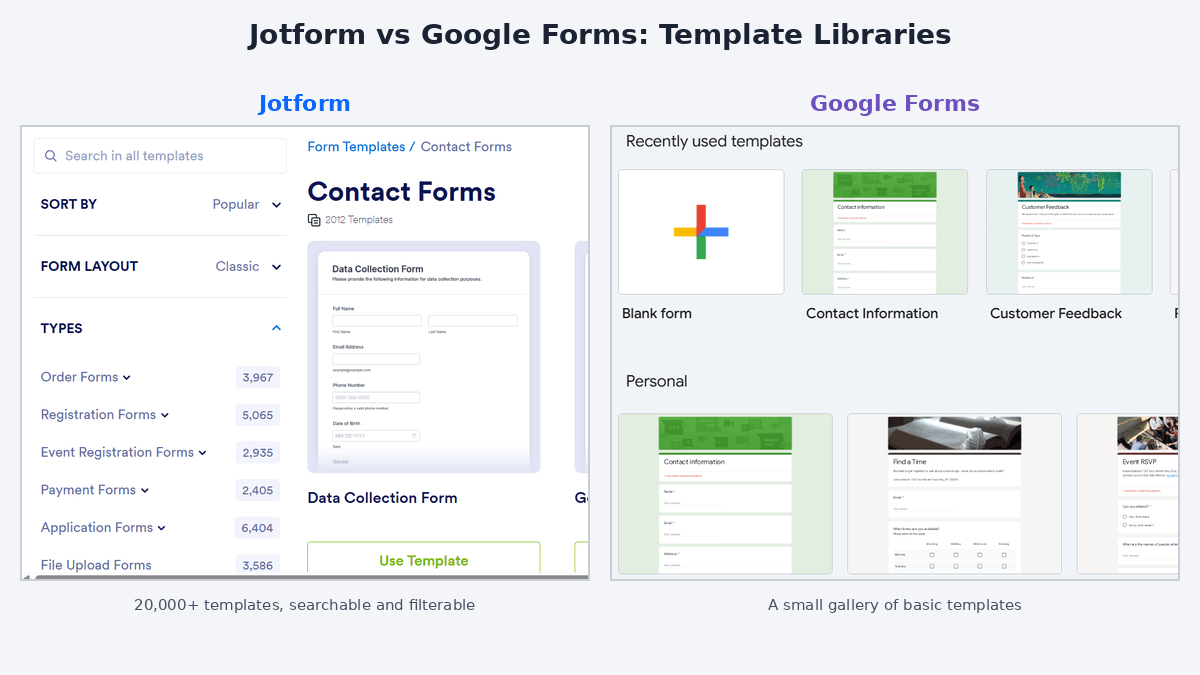
Verdict: Jotform, clearly, for professional-looking forms.
Features: Logic, Payments and Signatures
Conditional logic
Google Forms lets you send people to different sections based on their answers. That covers simple branching. Jotform goes further, letting you show or hide individual fields, skip pages, run calculations and trigger different emails based on responses.
Payments
Google Forms doesn’t have a built-in way to collect payments. Jotform includes payment fields that connect to gateways such as Stripe, PayPal and Square, so you can take deposits, sell products or collect fees directly through a form.
E-signatures
If you need clients to sign agreements, Jotform supports e-signatures so you can collect signed documents online. Google Forms has no equivalent, so you’d need a separate tool.
File uploads
Both tools support file uploads, but in Google Forms respondents generally need to be signed in to a Google account to upload, which can put clients off. Jotform doesn’t have that requirement.
Verdict: Jotform wins by a wide margin on features.
Integrations
Google Forms works best inside Google’s world: responses flow into Google Sheets, and it pairs well with Drive and Gmail. Outside that, you’ll usually need a connector tool.
Jotform connects with Google Sheets, Google Drive, Slack, Notion, Mailchimp, Zapier and many other apps, so submissions can go wherever your workflow needs them.
Verdict: A tie if you only use Google tools. Jotform wins if you use a wider mix of apps.
Pricing
Google Forms: free with a personal Google account. Google Workspace plans add admin and security features, but the forms themselves cost nothing extra.
Jotform: free Starter plan with 5 forms and 100 monthly submissions. Paid plans start at roughly $34 a month on annual billing (about $39 month to month) and add more forms, submissions, storage and features. Prices change, so check the current pricing page.
Verdict: Google Forms is cheaper, since it costs nothing. Jotform’s paid plans make sense if you’ll use payments, signatures or higher volume. You can start on the free plan and upgrade only when you need to.
Jotform vs Google Forms: Which Should You Choose?
Choose Google Forms if you:
- Need a quick, free survey or sign-up sheet
- Work entirely inside Google Workspace
- Don’t need payments, signatures or branding
- Are building simple internal forms
Choose Jotform if you:
- Want forms that look professional and match your brand
- Need to collect payments or deposits
- Want clients to sign agreements online
- Need advanced logic, calculations or approvals
- Use many different apps and want data sent automatically
The simple rule: Google Forms is great for collecting answers. Jotform is better for running a process, such as taking a booking, a payment and a signature in one flow.
Frequently Asked Questions
Is Jotform better than Google Forms?
It depends on your needs. Jotform is better for payments, e-signatures, templates, design control and advanced logic. Google Forms is better for quick, simple, free surveys, especially if you already live in Google Workspace.
Is Google Forms really free?
Yes. Google Forms is free with a Google account, with no cap on the number of forms you can create.
Is Jotform free?
Jotform has a free plan with limits on the number of forms and monthly submissions. Paid plans raise those limits and add features.
Can Google Forms accept payments?
Not natively. You would need a workaround or an add-on. Jotform has built-in payment fields that connect to gateways such as Stripe and PayPal.
Can I switch from Google Forms to Jotform?
Yes. You can rebuild your form in Jotform quickly using a template, and export your Google Forms responses from Google Sheets to keep your data.
Which is better for a small business or freelancer?
Most small businesses and freelancers benefit from Jotform because of its payment collection, e-signatures, branding options and integrations. Google Forms is enough for basic internal forms and simple surveys.
Final Thoughts
Google Forms is a solid, free tool for simple jobs. But once you want forms that look professional, collect money, capture signatures or connect to the rest of your workflow, you’ll outgrow it.
Jotform covers all of that, and its free plan lets you try it before spending anything. A good approach is to rebuild one of your current Google Forms in Jotform and compare the two side by side.