
What is Honeypot Field in a Form?
A honeypot field in a form is a spam-prevention technique used to trap automated bots without affecting real users.
Here’s how it works
Basic Idea
- A honeypot field is an extra, hidden input field added to your contact form.
- This field is invisible to human users (hidden using CSS or JavaScript), so a normal user will never fill it in.
- Spam bots, however, usually fill in every form field they find — including the hidden one.
- When the form is submitted, your server checks if the honeypot field has any value:
- ✅ Empty → Real human
- Filled → Likely a bot → Reject submission
Let’s take an example of contact form as showing in the image below:
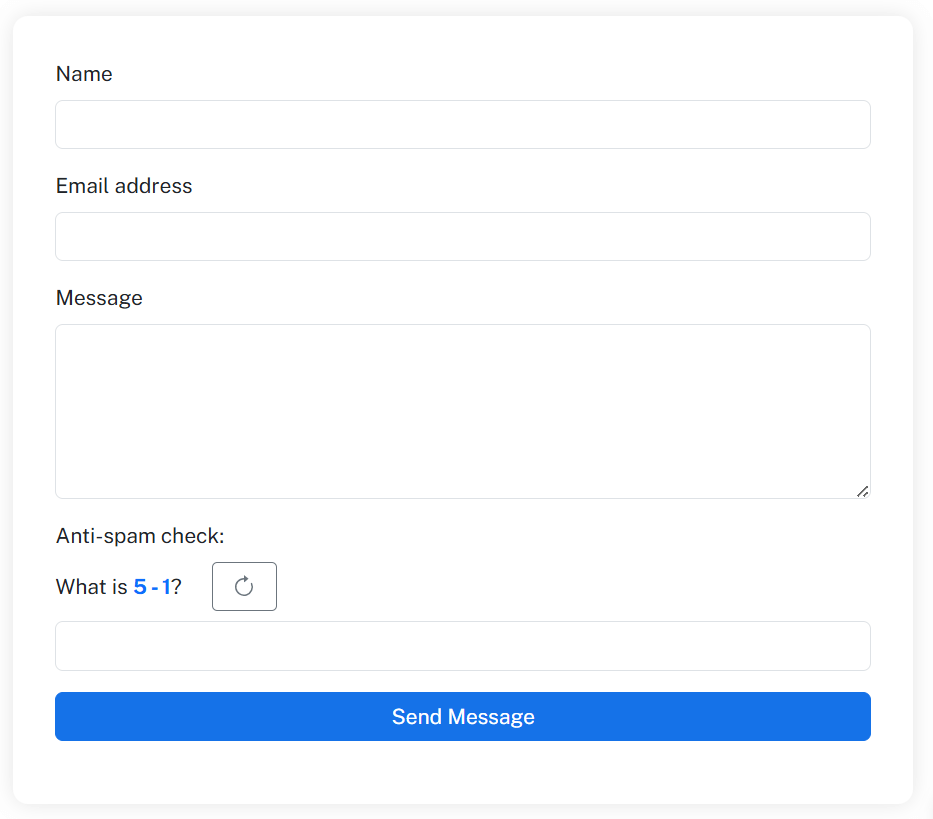
Below is a contact form with fields like name, email, and message. It also contains honeypot hidden field to check real human. It is in hidden form button not added as <input type="text">. That’s why robots cannot detect it and fills out the honeypot field.
If the honeypot field is filled with some data, the script detect it and does not allow to submit the form. Hence, this restrict bots from filling out and submit the form.
|
1 2 3 4 5 6 7 8 9 10 11 12 13 14 15 16 17 18 19 20 21 22 23 24 25 26 27 28 29 30 31 32 33 34 35 36 37 38 39 40 41 42 43 44 45 46 47 48 49 50 51 52 53 54 55 56 57 58 59 60 61 62 63 64 65 66 67 68 69 70 71 72 73 74 75 76 77 78 79 80 81 82 83 84 |
<div class="contact-form-container"> <h2 class="form-title d-none">Contact Us</h2> <!-- Success/Error Messages --> <div id="successAlert" class="alert alert-success" role="alert"> Your message has been sent successfully! </div> <div id="errorAlert" class="alert alert-danger" role="alert"> There was an error sending your message. Please try again. </div> <div id="spamAlert" class="alert alert-warning" role="alert"> Our system detected potential spam activity. Please try again. </div> <form id="contactForm" novalidate> <!-- Honeypot Field - Hidden from humans but visible to bots --> <div class="honeypot-field"> <label for="website">Leave this field empty</label> <input type="text" id="website" name="website" autocomplete="off"> </div> <!-- Time-based spam detection --> <input type="hidden" id="formLoadTime" name="formLoadTime"> <!-- Name Field --> <div class="mb-3"> <label for="name" class="form-label">Name</label> <input type="text" class="form-control" id="name" name="name" required> <div class="invalid-feedback"> Please provide your name. </div> </div> <!-- Email Field --> <div class="mb-3"> <label for="email" class="form-label">Email address</label> <input type="email" class="form-control" id="email" name="email" required> <div class="invalid-feedback"> Please provide a valid email address. </div> </div> <!-- Message Field --> <div class="mb-3"> <label for="message" class="form-label">Message</label> <textarea class="form-control" id="message" name="message" rows="5" required></textarea> <div class="invalid-feedback"> Please provide a message. </div> </div> <!-- JavaScript Challenge --> <div class="mb-3" id="jsChallenge"> <label for="humanCheck" class="form-label"> Anti-spam check: </label> <div class="math-container"> <span>What is <span id="mathQuestion" class="math-question"></span>?</span> <button type="button" class="btn btn-outline-secondary btn-sm refresh-btn" id="refreshMath"> <svg xmlns="http://www.w3.org/2000/svg" width="16" height="16" fill="currentColor" class="bi bi-arrow-clockwise" viewBox="0 0 16 16"> <path fill-rule="evenodd" d="M8 3a5 5 0 1 0 4.546 2.914.5.5 0 0 1 .908-.417A6 6 0 1 1 8 2v1z"/> <path d="M8 4.466V.534a.25.25 0 0 1 .41-.192l2.36 1.966c.12.1.12.284 0 .384L8.41 4.658A.25.25 0 0 1 8 4.466z"/> </svg> </button> </div> <input type="text" class="form-control mt-2" id="humanCheck" name="humanCheck" required> <div class="invalid-feedback"> Please answer the simple math question correctly. </div> </div> <!-- Submit Button --> <button type="submit" class="btn btn-primary w-100" id="submitBtn"> Send Message </button> <!-- Loading Spinner --> <div class="text-center mt-3"> <div class="spinner-border text-primary" role="status" id="loadingSpinner"> <span class="visually-hidden">Loading...</span> </div> </div> </form> </div> |
Below is some CSS to add some design to the form. If you want to make it more beautiful, you can add more CSS as per your requirements.
|
1 2 3 4 5 6 7 8 9 10 11 12 13 14 15 16 17 18 19 20 21 22 23 24 25 26 27 28 29 30 31 32 33 34 35 36 37 38 |
<style> .contact-form-container { max-width: 600px; margin: 0 auto; background: white; padding: 2rem; border-radius: 10px; box-shadow: 0 0 15px rgba(0,0,0,0.1); } .honeypot-field { position: absolute; left: -9999px; opacity: 0; } .form-title { color: #0d6efd; margin-bottom: 1.5rem; text-align: center; } .alert { display: none; } .spinner-border { display: none; } .math-question { font-weight: bold; color: #0d6efd; } .refresh-btn { margin-left: 10px; } .math-container { display: flex; align-items: center; gap: 10px; } </style> |
The JS code given below handles the captcha and form submission process. Users can refresh the captcha and generate next math questions. Users then have to fill the captcha fill to submit the form. It also adds some more security to detect robots and stop spamming.
|
1 2 3 4 5 6 7 8 9 10 11 12 13 14 15 16 17 18 19 20 21 22 23 24 25 26 27 28 29 30 31 32 33 34 35 36 37 38 39 40 41 42 43 44 45 46 47 48 49 50 51 52 53 54 55 56 57 58 59 60 61 62 63 64 65 66 67 68 69 70 71 72 73 74 75 76 77 78 79 80 81 82 83 84 85 86 87 88 89 90 91 92 93 94 95 96 97 98 99 100 101 102 103 104 105 106 107 108 109 110 111 112 113 114 115 116 117 118 119 120 121 122 123 124 125 126 127 128 129 130 131 132 133 134 135 136 137 138 139 140 141 142 143 144 145 146 147 148 149 150 151 152 153 154 155 156 157 158 159 160 161 162 163 164 165 166 167 168 169 170 171 172 173 174 175 176 177 178 179 180 181 182 183 184 185 186 187 188 189 190 191 192 193 194 195 196 197 198 199 200 201 202 203 204 205 206 207 208 209 210 211 212 |
<script> $(document).ready(function() { // Set form load time for time-based spam detection $('#formLoadTime').val(Date.now()); // Generate initial random math question generateMathQuestion(); const $form = $('#contactForm'); const $submitBtn = $('#submitBtn'); const $loadingSpinner = $('#loadingSpinner'); const $successAlert = $('#successAlert'); const $errorAlert = $('#errorAlert'); const $spamAlert = $('#spamAlert'); const $refreshBtn = $('#refreshMath'); // Hide all alerts initially $successAlert.hide(); $errorAlert.hide(); $spamAlert.hide(); // Refresh math question when button is clicked $refreshBtn.on('click', function() { generateMathQuestion(); $('#humanCheck').val(''); }); $form.on('submit', function(event) { event.preventDefault(); event.stopPropagation(); // Hide any previous alerts $successAlert.hide(); $errorAlert.hide(); $spamAlert.hide(); // Check if form is valid if (this.checkValidity() === false) { $(this).addClass('was-validated'); return; } // Anti-spam checks const spamCheckResult = performSpamChecks(); if (!spamCheckResult.isHuman) { $spamAlert.text(spamCheckResult.message).show(); $form.addClass('was-validated'); // Generate new math question if the answer was wrong if (spamCheckResult.reason === 'math') { generateMathQuestion(); $('#humanCheck').val(''); } return; } // Show loading state $submitBtn.prop('disabled', true); $loadingSpinner.show(); // Process form submission with AJAX processFormSubmission(); }); function generateMathQuestion() { const num1 = Math.floor(Math.random() * 10) + 1; const num2 = Math.floor(Math.random() * 10) + 1; const operators = ['+', '-', '*']; const operator = operators[Math.floor(Math.random() * operators.length)]; let question = `${num1} ${operator} ${num2}`; let answer; switch(operator) { case '+': answer = num1 + num2; break; case '-': // Ensure positive result for subtraction answer = Math.max(num1, num2) - Math.min(num1, num2); question = `${Math.max(num1, num2)} ${operator} ${Math.min(num1, num2)}`; break; case '*': answer = num1 * num2; break; } $('#mathQuestion').text(question); $('#jsChallenge').attr('data-answer', answer); } function performSpamChecks() { // Honeypot check - if this field is filled, it's likely a bot if ($('#website').val() !== '') { return { isHuman: false, reason: 'honeypot', message: 'Our system detected potential spam activity. Please try again.' }; } // Time-based check - if form is submitted too quickly, it's likely a bot const formLoadTime = parseInt($('#formLoadTime').val()); const submitTime = Date.now(); const timeSpent = (submitTime - formLoadTime) / 1000; // in seconds // If form was submitted in less than 3 seconds, it's suspicious if (timeSpent < 3) { return { isHuman: false, reason: 'time', message: 'Our system detected unusually fast form submission. Please take your time and try again.' }; } // JavaScript challenge check const humanCheck = $('#humanCheck').val().trim(); const correctAnswer = $('#jsChallenge').attr('data-answer'); if (humanCheck === '' || parseInt(humanCheck) !== parseInt(correctAnswer)) { return { isHuman: false, reason: 'math', message: 'Please answer the math question correctly to prove you are human.' }; } // Check for suspicious keywords in the message const message = $('#message').val().toLowerCase(); const spamKeywords = [ 'viagra', 'casino', 'loan', 'mortgage', 'investment', 'bitcoin', 'crypto', 'nude', 'porn', 'sex', 'xxx' ]; for (let keyword of spamKeywords) { if (message.includes(keyword)) { return { isHuman: false, reason: 'keywords', message: 'Our system detected suspicious content in your message. Please revise and try again.' }; } } return { isHuman: true }; } function processFormSubmission() { // Collect form data const formData = new FormData(); formData.append('name', $('#name').val()); formData.append('email', $('#email').val()); formData.append('message', $('#message').val()); formData.append('math_answer', $('#jsChallenge').attr('data-answer')); // Send AJAX request to PHP script $.ajax({ url: 'send_email', type: 'POST', data: formData, processData: false, contentType: false, dataType: 'json' }) .done(function(data) { // Hide loading state $submitBtn.prop('disabled', false); $loadingSpinner.hide(); if (data.success) { // Show success message $successAlert.show(); // Reset form $form.trigger('reset'); $form.removeClass('was-validated'); // Generate new math question generateMathQuestion(); } else { // Show error message $errorAlert.text(data.message || 'There was an error sending your message.').show(); } // Scroll to top to show message $('html, body').animate({ scrollTop: 0 }, 300); }) .fail(function(xhr, status, error) { // Hide loading state $submitBtn.prop('disabled', false); $loadingSpinner.hide(); // Show error message $errorAlert.text('Network error. Please check your connection and try again.').show(); // Scroll to top to show message $('html, body').animate({ scrollTop: 0 }, 300); console.error('Error:', error); }); } // Real-time validation for email field $('#email').on('input', function() { if (this.validity.typeMismatch) { this.setCustomValidity('Please enter a valid email address.'); } else { this.setCustomValidity(''); } }); }); </script> |
|
1 2 3 4 5 6 7 8 9 10 11 12 13 14 15 16 17 18 19 20 21 22 23 24 25 26 27 28 29 30 31 32 33 34 35 36 37 38 39 40 41 42 43 44 45 46 47 48 49 50 51 52 53 54 55 56 57 58 59 60 61 62 63 64 65 66 67 68 69 70 71 72 73 74 75 76 77 78 |
<?php header('Content-Type: application/json'); // Enable error reporting for debugging (remove in production) error_reporting(E_ALL); ini_set('display_errors', 1); // Check if it's a POST request if ($_SERVER['REQUEST_METHOD'] !== 'POST') { echo json_encode(['success' => false, 'message' => 'Invalid request method.']); exit; } // Get form data $name = filter_var($_POST['name'] ?? '', FILTER_SANITIZE_STRING); $email = filter_var($_POST['email'] ?? '', FILTER_SANITIZE_EMAIL); $message = filter_var($_POST['message'] ?? '', FILTER_SANITIZE_STRING); // Validate required fields if (empty($name) || empty($email) || empty($message)) { echo json_encode(['success' => false, 'message' => 'All fields are required.']); exit; } // Validate email if (!filter_var($email, FILTER_VALIDATE_EMAIL)) { echo json_encode(['success' => false, 'message' => 'Invalid email address.']); exit; } // Email configuration $subject = 'New Contact Form Message from DeepToolSet'; $headers = [ 'From: ' . $email, 'Reply-To: ' . $email, 'X-Mailer: PHP/' . phpversion(), 'Content-Type: text/plain; charset=UTF-8' ]; // Email content $email_content = "You have received a new message from your website contact form.\n\n"; $email_content .= "Name: $name\n"; $email_content .= "Email: $email\n\n"; $email_content .= "Message:\n$message\n\n"; $email_content .= "Sent: " . date('Y-m-d H:i:s'); // Additional headers as string $headers_string = implode("\r\n", $headers); // Send email try { $mail_sent = mail($to, $subject, $email_content, $headers_string); if ($mail_sent) { echo json_encode([ 'success' => true, 'message' => 'Your message has been sent successfully!' ]); } else { // Log error for debugging error_log('Email sending failed for: ' . $email); echo json_encode([ 'success' => false, 'message' => 'Failed to send email. Please try again later.' ]); } } catch (Exception $e) { // Log the exception error_log('Email exception: ' . $e->getMessage()); echo json_encode([ 'success' => false, 'message' => 'An error occurred while sending your message.' ]); } ?> |
Honeypot is an easy to add field and its invisible to genuine users. It can stop spam bots from filling out and submit the form.
Conclusion
Adding a honeypot field to your contact form is a simple yet powerful way to protect your website from spam submissions. It works silently in the background, catching bots without bothering real users — no CAPTCHAs, no extra clicks.
By combining a honeypot with basic server-side validation or rate limiting, you can keep your forms secure, user-friendly, and efficient. It’s one of the easiest anti-spam methods every website owner should implement to maintain a clean and trustworthy contact system.