
Imagine you’re launching a website tonight. The design looks great, the copy is polished, and then — your contact form breaks. The email script keeps failing silently, and you have no idea why. It’s midnight, you’re not a developer, and your “quick form” has turned into hours of debugging.
That’s a scene most people building a website have lived through at least once. And it’s exactly why the question “HTML form or no-code form builder?” matters more than it sounds like it should.
Forms are one of the most common elements on the web. Every contact page, checkout flow, survey, and signup screen relies on one. But when it’s time to actually build a form, there are two very different paths you can take: write it yourself in raw HTML (plus CSS, JavaScript, and backend code), or use a no-code form builder that lets you assemble the same thing visually.
Both approaches can get you to the same destination — a working form that collects data. But the journey, the cost, and how many late nights you spend debugging failed email scripts look completely different depending on which route you choose.
This guide breaks down the real differences between HTML forms and no-code form builders so you can decide which one actually fits your situation.
➜ If you’d rather skip straight to building instead of reading about the debugging — Try Jotform Free
What Is an HTML Form?
An HTML form is a section of a webpage built using the native <form> element, along with input fields like <input>, <select>, <textarea>, and <button>. A basic HTML form might look like this:
|
1 2 3 4 5 6 7 8 9 |
<form action="/submit" method="POST"> <label for="name">Name</label> <input type="text" id="name" name="name" required> <label for="email">Email</label> <input type="email" id="email" name="email" required> <button type="submit">Submit</button> </form> |
On its own, this code creates the visual structure of a form. But that’s only the beginning. To make the form actually functional — validating input, preventing spam, styling it to match your brand, storing submissions, and sending confirmation emails — you need additional layers:
In other words, the <form> tag is just the skeleton. Everything that makes a form actually useful has to be built on top of it, by hand, by someone who knows how to code. This is usually the part people don’t budget time for — and it’s exactly where that midnight debugging session comes from.
What Is a No-Code Form Builder?
A no-code form builder is a platform that lets you design and publish fully functional forms through a visual, drag-and-drop interface — no coding required. Tools like Jotform are built specifically for this purpose.
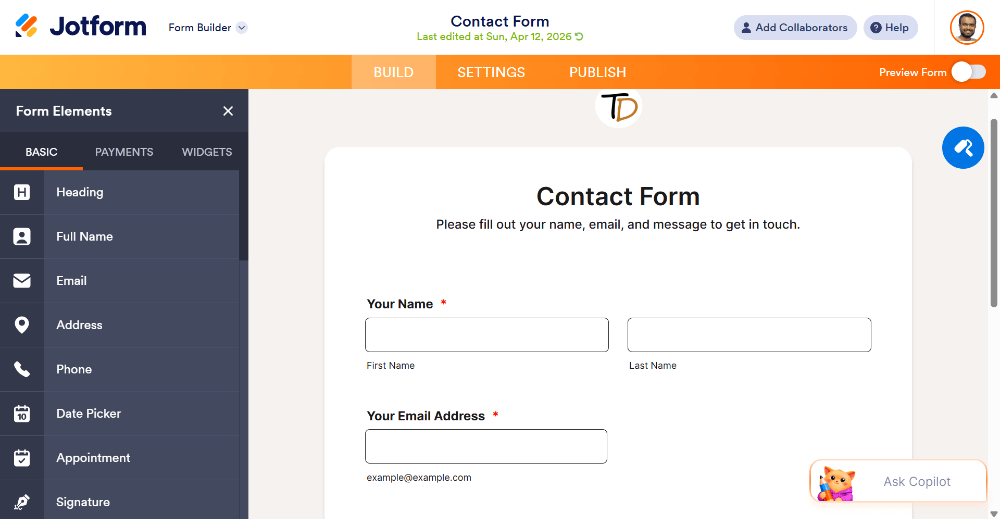
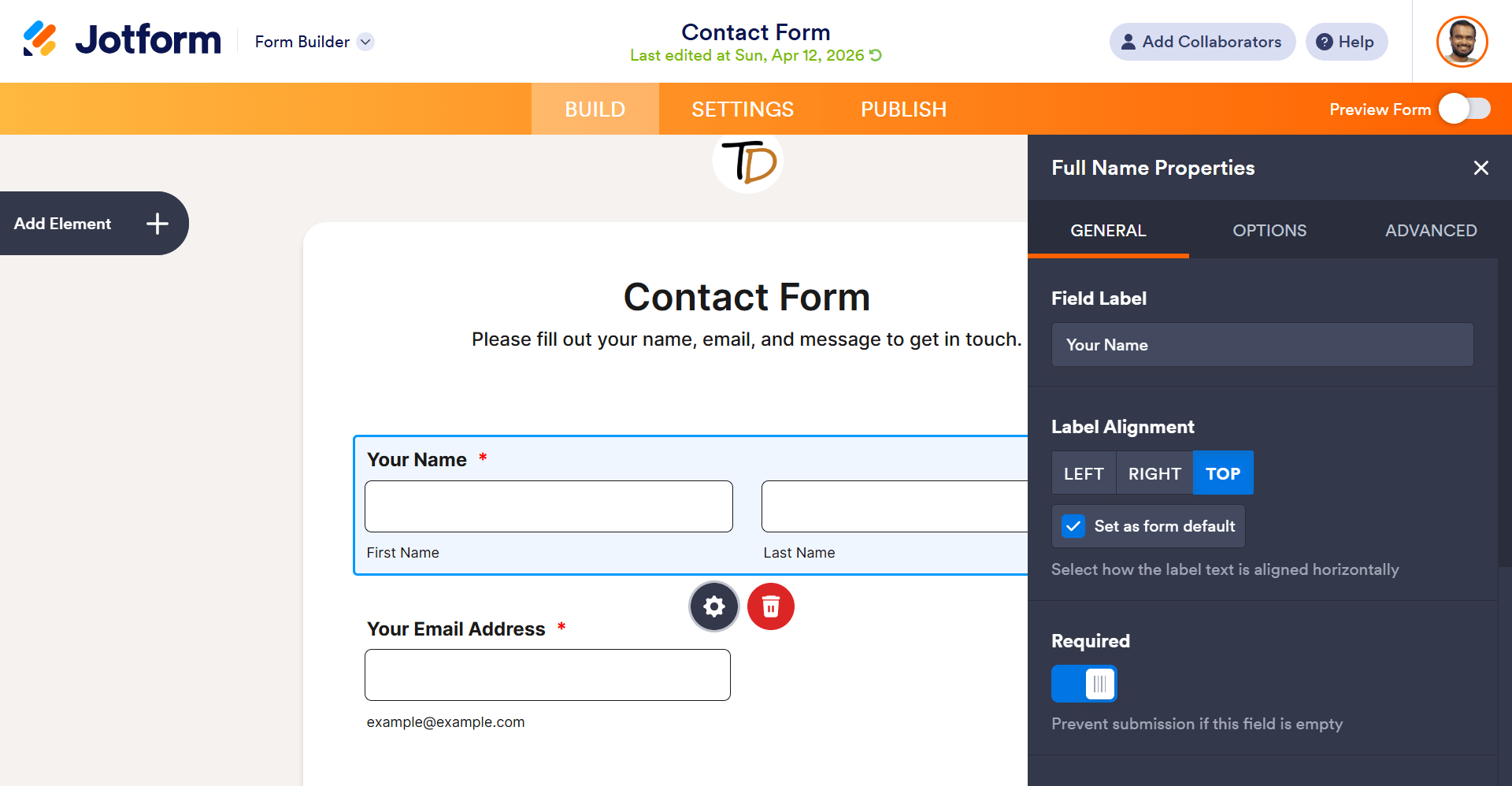
Instead of writing <input> tags, you drag a “Text Field” element onto a canvas. Instead of writing JavaScript to show or hide fields conditionally, you set a rule through a visual menu.
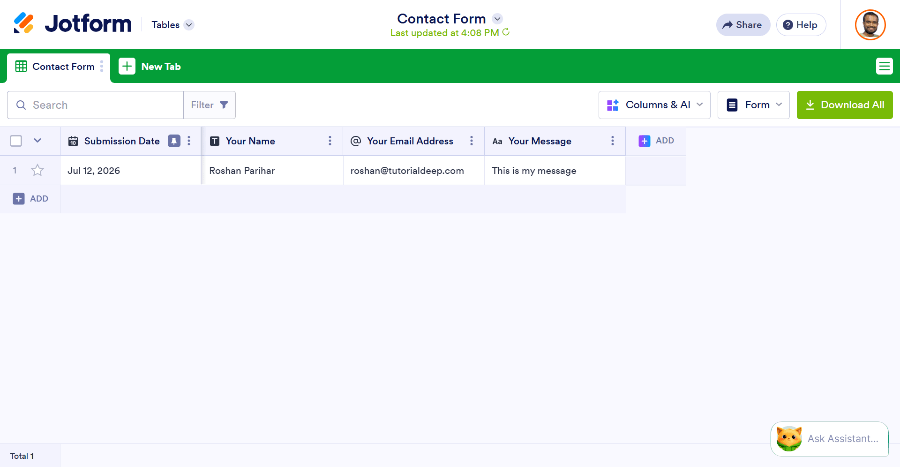
Instead of building a backend to store submissions, the platform handles storage, notifications, and integrations automatically.
The output is the same as a hand-coded form — a working form on a webpage — but the process of building it looks completely different and faster.
➜ Start Using Jotform Today for Free(No Credit Card Required)
Which Should You Choose? It Depends on Who You Are
Feature comparisons only tell half the story. The better question is: what situation are you actually in? Here’s how it plays out for a few common cases.
The small business owner who needs a contact form today.
You’re not trying to learn to code — you need leads coming in by tomorrow morning. A no-code form builder wins here, easily. You don’t have hours to spare on a script that keeps throwing errors.
The student learning web development.
If the whole point is understanding how forms actually work under the hood — validation, submission handling, the DOM — then writing raw HTML is the right exercise. A no-code builder would skip the very thing you’re trying to learn. HTML wins here.
The freelancer juggling five client projects.
Time is the scarcest resource. Coding a custom form for every client eats into billable hours you could spend elsewhere. A no-code builder lets you deliver a polished, working form in the time it would take to just plan out the HTML structure. No-code wins.
The SaaS developer building custom backend logic.
If the form needs to feed into a proprietary database with unusual business logic, trigger custom workflows, or integrate deeply with an existing codebase, hand-coded HTML (or a hybrid approach) makes more sense. HTML wins here.
Notice the pattern: the deciding factor usually isn’t “which tool is objectively better” — it’s which one matches what you’re actually trying to accomplish right now.
Head-to-Head Comparison
With those scenarios in mind, let’s break the comparison down into the categories that actually matter.
1. Speed of Development
This is where the gap is widest. A simple HTML contact form might take an experienced developer 30–60 minutes to build, style, and test — if nothing goes wrong. But most real-world forms aren’t that simple, and things do go wrong.
Add conditional logic, file uploads, multi-step pages, or payment collection, and that estimate balloons to several hours or even days, especially once you factor in cross-browser testing, mobile responsiveness, and the inevitable “why isn’t this email sending” troubleshooting session.
With a no-code form builder, the same multi-step form with conditional logic and payment integration can be built in well under an hour, often in just minutes, because all of those features already exist as pre-built components. You’re assembling, not constructing from raw materials — and not debugging a broken mail script at midnight.
Winner: No-code form builder, especially for anything beyond the simplest static form.
2. Coding Skill Required
HTML forms require, at minimum, working knowledge of HTML. But a *functional* form — one that validates data, stores it securely, and integrates with other tools — realistically requires HTML, CSS, JavaScript, and backend development skills. That’s a significant skill barrier for small business owners, marketers, or teams without dedicated developers.
No-code builders remove that barrier entirely. Anyone who can use a word processor can typically learn to use a drag-and-drop form builder within minutes. This matters more than it might seem — a huge share of people searching for form-building help aren’t developers at all, and for them, “just write some HTML” isn’t practical advice.
Winner: No-code form builder, for accessibility to non-developers and beginners.
3. Customization and Design Control
This is one area where HTML forms can have an edge — in theory. Since you’re writing raw code, you have complete control over every pixel, every interaction, and every line of markup. If you need a form that behaves in a very specific, unconventional way, custom code gives you unlimited flexibility.
That said, modern no-code builders have closed much of this gap. Most platforms now offer custom CSS injection, brand color and font controls, and flexible layout options that cover the vast majority of design needs without touching code.
Winner: HTML forms, but only for highly specialized or unconventional design requirements. For everyday use cases, no-code builders are close enough that the difference is rarely noticeable to end users.
4. Security
Security is often the most overlooked part of building a form — and the most dangerous to get wrong. A hand-coded form needs manual implementation of:
- Input sanitization (to prevent SQL injection and XSS attacks)
- CSRF protection
- Spam and bot filtering (CAPTCHA, honeypots)
- Secure data storage and encryption
- Compliance considerations (GDPR, HIPAA, etc.)
Missing any one of these can expose your users’ data or your systems to attack. This isn’t a one-time task either — security practices evolve, and a form built two years ago may no longer meet current standards.
If implementing spam protection, encryption, and secure email notifications yourself sounds like a lot of unnecessary work for a contact form, that’s exactly where a platform like Jotform> saves time — these protections come built in, without needing to understand the implementation behind them.
➜ See how it’s handled: explore Jotform’s built-in security features
Winner: No-code form builder, for teams without dedicated security expertise — which is most teams.
5. Integrations
Getting form data to actually go somewhere useful — a CRM, a spreadsheet, an email inbox, a Slack channel — normally requires API integration work when building with raw HTML. That means writing code to connect to each service’s API, handling authentication, and managing errors when those APIs change.
Instead of writing custom API code to push submissions into Google Sheets, Slack, or Mailchimp, a no-code builder usually lets you connect these in a few clicks. You’re not buying a product feature so much as buying back the hours you’d otherwise spend reading API documentation.
➜ Curious what’s available: browse Jotform’s integrations
Winner: No-code form builder, by a wide margin.
6. Maintenance and Long-Term Costs
A coded form isn’t a “set it and forget it” asset. Over time, you’ll need to:
- Update libraries and dependencies
- Fix browser compatibility issues as standards evolve
- Patch security vulnerabilities
- Modify the form as business requirements change
Each of these tasks requires developer time — time that has a real cost, whether that’s an in-house developer’s salary or a freelancer’s invoice.
No-code platforms handle most of this maintenance on the backend. Updates, security patches, and new features roll out automatically, and modifying a form yourself takes minutes rather than a development ticket.
Winner: No-code form builder, especially over the long term.
7. Cost
At first glance, HTML forms seem “free” since there’s no subscription fee. But that ignores the cost of developer time, which is rarely cheap. A few hours of developer time to build, test, and maintain a form can easily exceed the cost of a year’s subscription to a no-code platform.
No-code builders typically operate on a freemium model — free for basic use, with paid tiers for higher submission volumes, storage, or advanced features. For most small-to-medium use cases, the free or low-cost tiers are often sufficient.
Winner: No-code form builder, when you factor in the true cost of developer time.
8. Scalability
For very large, highly customized, enterprise-grade systems with unique data architecture requirements, custom-coded solutions may offer more control over scaling infrastructure exactly to specification.
However, most no-code platforms are built on scalable cloud infrastructure and can easily handle high submission volumes, large file uploads, and enterprise-level traffic without any additional engineering work on your end.
Winner: Tie, depending on the complexity and scale of your specific use case.
Quick Comparison Table
| Category | HTML Form | No-Code Form Builder |
|---|---|---|
| Speed to build | Slow (hours–days) | Fast (minutes) |
| Coding skill needed | Yes (HTML/CSS/JS/backend) | None |
| Beginner friendly | ❌ | ✅ |
| Design flexibility | Unlimited (with effort) | High, but template-based |
| Security | Manual implementation | Built-in |
| Integrations | Manual API work | Pre-built, one-click |
| Maintenance | Ongoing developer time | Managed automatically |
| Cost | “Free” but developer time-intensive | Low-cost subscription, faster ROI |
| Best for | Highly specialized custom builds | Almost everyone else |
When an HTML Form Still Makes Sense
To be fair, there are scenarios where hand-coding a form is genuinely the right call:
- You need extremely specific, unconventional interactions that no builder supports out of the box.
- You’re building a form as part of a larger custom application where it needs to integrate tightly with proprietary backend logic.
- You have an in-house development team with time allocated specifically for this kind of work, and full control over the codebase is a hard requirement.
- You’re learning web development and building forms manually is part of the educational exercise.
In these cases, custom code gives you total control, and that control is worth the added time investment.
When a No-Code Form Builder Makes More Sense
For the vast majority of everyday use cases, a no-code builder is simply the more efficient choice:
- Contact and lead generation forms
- Event and webinar registrations
- Customer surveys and feedback forms
- Job applications
- Order and payment forms
- Appointment scheduling
- Internal HR and approval workflows
If your form’s purpose is to collect information and move it into your existing systems — rather than to serve as a showcase of unique, highly customized interaction design — a no-code builder gets you there faster, more securely, and at lower cost.
Platforms like Jotform are a good illustration of how far this category has come: a drag-and-drop builder, 10,000+ templates, built-in conditional logic, and native integrations with payment gateways, CRMs, and hundreds of other apps — all without writing a line of code, and without the 11 PM debugging session.
➜ Want to see it for yourself? Start building with Jotform — free
Frequently Asked Questions
Q1. Is a no-code form builder as secure as a custom-coded form?
In most cases, more so. No-code platforms have dedicated security teams maintaining SSL encryption, spam protection, and compliance features across their entire platform — protections that would take significant time and expertise to replicate manually.
Q2. Can I still customize the design of a no-code form?
Yes. Most no-code builders allow custom colors, fonts, layouts, and even custom CSS for advanced styling, so your form can match your brand closely without writing code from scratch.
Q3. Do no-code form builders work on mobile devices?
Yes, forms built with reputable no-code platforms are responsive by default and automatically adjust to different screen sizes.
Q4. Will I ever need to hire a developer if I use a no-code form builder?
For the vast majority of standard use cases, no. Developers are typically only needed for highly specialized integrations or unusual technical requirements that fall outside a builder’s native capabilities.
Q5. Which option is cheaper in the long run?
When you account for developer time spent building, testing, securing, and maintaining a custom form, no-code builders are almost always the more cost-effective option, especially for small and medium-sized businesses.
Final Verdict: Which Is Better?
There’s no universal answer that applies to every project, but for the overwhelming majority of use cases — contact forms, registrations, surveys, applications, and order forms — a no-code form builder wins on speed, cost, security, and maintenance.
It removes the technical barrier entirely and lets you focus on what the form is actually for, rather than the mechanics of building it.
HTML forms still have a place for highly specialized, custom-built systems where total control over every line of code is a genuine requirement, or for developers and students who need to understand the mechanics firsthand.
But for everyday business and personal use, tools like Jotform deliver the same end result — a secure, professional, functional form — in a fraction of the time, without needing to write a single line of code.
If you’re weighing the two options for your next project, ask yourself one question: does this form need to do something truly unique that no builder supports? If the answer is no, a no-code form builder is very likely the better choice — and Jotform is a solid place to start.